Bulk Location Uploads and Product Assignments in Salesforce Communications Cloud on Core


In today’s fast-changing digital economy, every business is looking for smarter, faster, and more reliable ways to manage revenue. From quote generation to payment collection, companies need seamless systems that connect sales, finance, and customer service. This is where Salesforce Revenue Cloud comes in — and why professionals skilled in this technology are among the most sought-after in the global job market.


Many CSPs relied on workarounds or custom tools, highlighting the gap in large-scale location onboarding within the quoting journey. With recent enhancements, Communications Cloud on Core now supports efficient bulk upload capabilities that significantly improve how sales teams prepare and structure quotes.


Users can upload multiple locations in a single step, validate serviceability, and associate them with products seamlessly. This advancement not only accelerates the quoting process but also enhances accuracy and reduces operational bottlenecks. As a result, Communications Cloud on Core now offers a robust, scalable foundation for handling high-volume, multi-site quoting with ease.
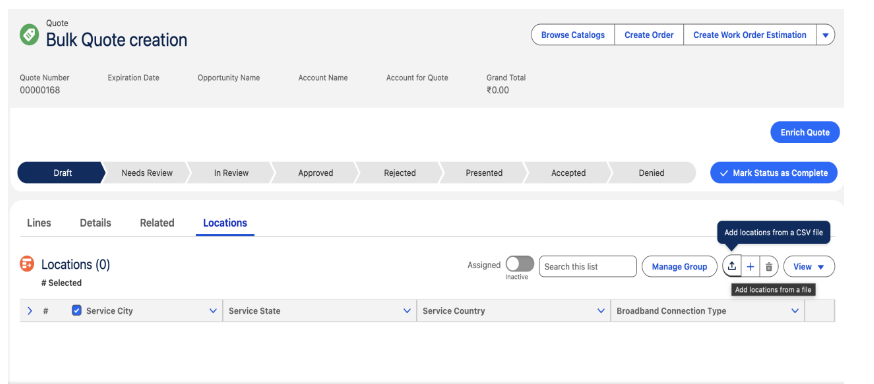

1. Bulk Upload of Locations in the Quote

Go to Communications cloud Salesforce application from App launcher, Create a quote and you will navigated to quote record page then click on Locations tab after the related tab there you can find Upload file button.

Here I’m attaching the CSV file format please take a look at this and create a CSV like that with your locations mentioned.
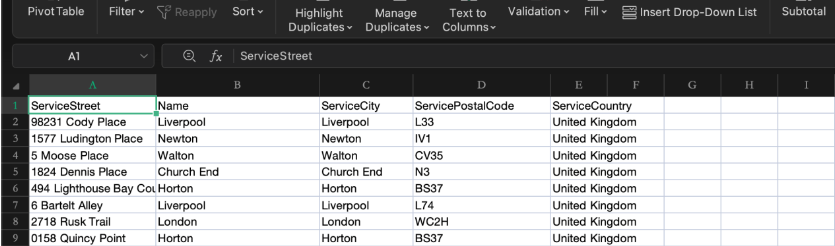
after uploading the locations it will get saved under the QuoteLineItemRecipient.
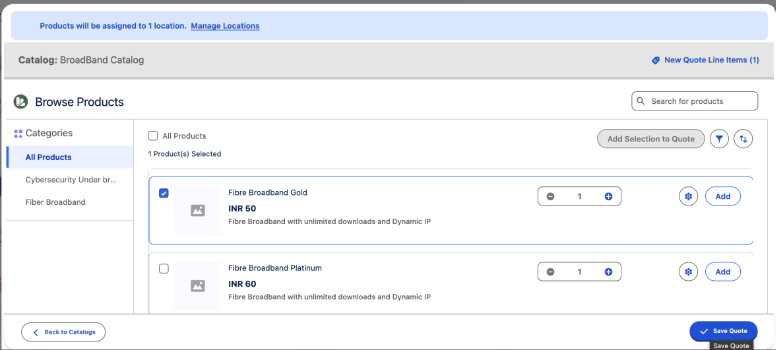
2. Browse Catalog for mapping the location and product.

 In Browse catalog button where we will find the catalogs, categories and products under each category would be visible.
 Before choosing the products, first select the locations where you want to apply your products and create the quotes then click browse catalog button.
 While clicking browse catalog we need to choose the price book from where the prices will be flow to our products then choose catalog and categories where the products present.
 After choosing it click on Add and Save quote. Repeat these steps for other locations as well.

Conclusion:

Overall, Salesforce Communication Cloud on Core now delivers a highly improved and efficient quote creation system that simplifies even the most complex sales scenarios. These enhancements make configuring large, multi-location deals faster, more accurate, and far more user-friendly for sales teams. 
With strengthened catalog browsing, location handling, and bulk line-item capabilities, the platform significantly elevates the end-to-end quoting process. Enhanced performance and streamlined workflows enable CSPs to manage high-volume enterprise quotes with confidence and consistency. Ultimately, Communication Cloud on Core provides a modern, scalable, and reliable foundation for comprehensive quote management.


📩 Join ForceArk Academy’s AI Accelerator Program today to begin your Salesforce Revenue Cloud journey.
👉 Visit ForcearkAcademy to learn more.